

Wialon Customizable Dashboards
Wialon Customizable Dashboards bring important fleet information together in one clear, visual workspace. Depending on your system configuration, you can monitor vehicle connectivity, movement, geofence presence, notifications, device health, mileage, fuel consumption, speeding events, and other relevant indicators. Dashboard blocks can be selected and rearranged so fleet managers can focus on the information that matters most to their operations. Available data depends on the tracking devices, sensors, permissions, and services configured for your account.
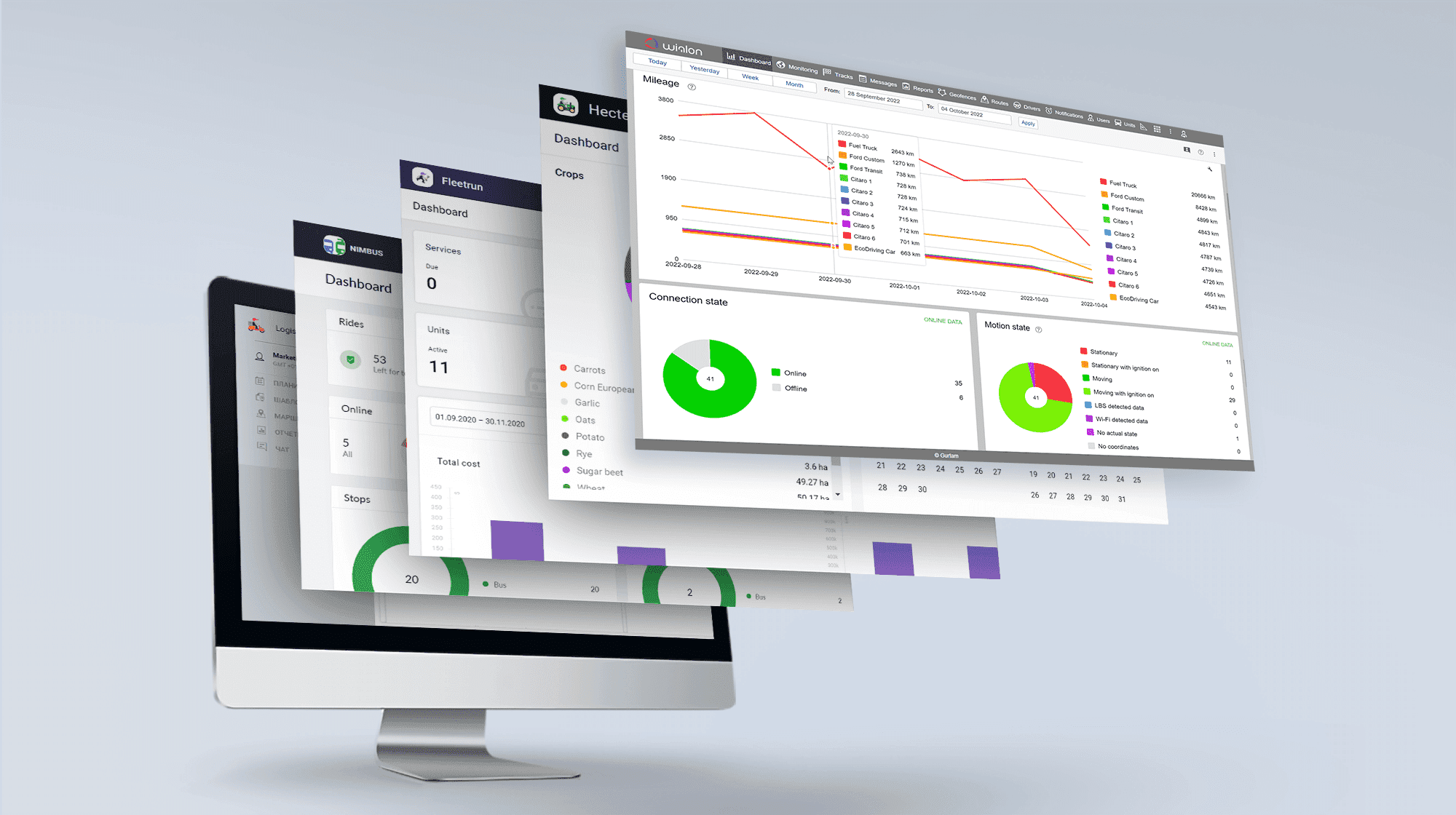
Focus on the Fleet Metrics That Matter
Every fleet has different priorities. A delivery company may concentrate on vehicle movement and geofence activity, while a service fleet may pay closer attention to device connectivity, mileage, and notifications. Wialon allows users to choose which dashboard blocks are displayed and arrange them in a practical order. This customization reduces unnecessary visual clutter and gives managers a focused overview based on their daily responsibilities, operational goals, and available tracking data.


Identify Fleet Issues More Quickly
Wialon dashboards help managers recognize situations that may require attention without reviewing every vehicle individually. Real-time blocks can summarize connection status, motion state, recent notifications, device health indicators, and the geofences where vehicles are currently located. Users can open dashboard categories to identify the affected vehicles and investigate further. By making exceptions easier to see, the dashboard can support faster responses to offline devices, unexpected movement, tracking-data problems, and other operational concerns.
Turn Fleet Data into Clear Operational Insights
A customizable Wialon dashboard can combine current fleet status with selected historical performance information. Depending on the configuration, managers can review metrics such as mileage, fuel consumption detected by compatible fuel-level sensors, and speeding events over selected periods. Visual charts and summaries make it easier to compare vehicles, identify unusual patterns, and determine where further analysis may be needed. Wialon also supports widget-based dashboards for areas such as trips, driver behaviour, maintenance, geofences, and emissions when the corresponding modules are available.

Create a Wialon Dashboard That Supports Better Decisions
Wialon Customizable Dashboards give your team a more relevant and accessible view of fleet activity. By organizing live status information and key performance indicators around your operational needs, you can spend less time searching through data and more time addressing exceptions, reviewing performance, and making informed decisions. Forall Tracking can help you configure a Wialon solution that reflects your fleet, available equipment, and management priorities. Contact us to learn how a customized Wialon dashboard can improve visibility across your operation.
Frequently Asked Questions
What is a customizable dashboard in Wialon?
A Wialon customizable dashboard is a visual workspace that summarizes important fleet information in charts, lists, and status blocks. It helps fleet managers review vehicle activity, device status, notifications, mileage, fuel data, speeding events, and other available indicators from one place.
What information can a Wialon dashboard display?
Depending on the Wialon product, account settings, and available tracking data, the dashboard can display vehicle connection status, motion state, geofence presence, recent notifications, device health, mileage, fuel consumption, speeding events, and other fleet metrics.
Can I choose which information appears on the dashboard?
Yes. Wialon allows supported dashboard blocks or widgets to be shown, hidden, and organized according to your operational priorities. Available customization options depend on the Wialon product and services enabled for your account.
Can Wialon dashboard blocks be rearranged?
Yes. Supported dashboard blocks and widgets can be moved into a more practical order. This allows important indicators to appear prominently while less frequently used information remains lower on the dashboard or is removed from view.
Does the Wialon dashboard show real-time fleet data?
Yes. Many dashboard sections update as Wialon receives new messages from compatible tracking devices. These sections can show current information such as vehicle connectivity, movement, geofence presence, device status, and recent notifications.
Can the dashboard display historical fleet information?
Yes. Selected dashboard sections can display historical indicators over a specified period. Depending on the configuration, these may include mileage, fuel consumption detected by fuel-level sensors, and speeding events.
Can Wialon show vehicle connection status on the dashboard?
Yes. The connection-status section can summarize which tracked vehicles or assets are online or offline. Users can open a category to identify the units associated with that status.
Can I monitor vehicle movement from the dashboard?
Yes. Wialon can summarize whether tracked vehicles are moving or stationary based on the messages received and the configured movement-detection settings. This provides a quick overview of current fleet activity.
Can the dashboard show vehicles inside geofences?
Yes. When geofences and the required settings are configured, Wialon can show which geofences currently contain tracked vehicles or assets. Users can review the vehicles located within each displayed geofence.
Can Wialon display recent notifications on the dashboard?
Yes. The dashboard can provide access to recent online notifications generated by configured monitoring rules. This helps managers review events that may require attention without opening several separate screens.
Can the dashboard help identify tracking-device problems?
Yes. With compatible devices and properly configured health-check criteria, Wialon can display indicators related to message transmission, GPS data, satellite count, battery level, voltage, and other device conditions. These indicators can help users identify units that may require investigation.
Can I view fleet mileage on a Wialon dashboard?
Yes. Wialon can display mileage information for selected vehicles over a chosen period. Mileage accuracy depends on the available GPS data, mileage sensors, and unit configuration.
Can Wialon dashboards show fuel consumption?
Yes. Wialon can display fuel-consumption information when compatible fuel-level sensors are installed and properly configured. The accuracy and availability of fuel information depend on the device, sensor, calibration, and transmitted data.
Can the dashboard display speeding information?
Yes. Wialon can summarize detected speeding events for selected vehicles and time periods when the appropriate speeding-detection method is configured. Users can then identify vehicles that may require further review.
Can I compare vehicles using the dashboard?
Yes. Selected charts and summaries can help users compare indicators such as mileage, fuel consumption, speeding, and other available metrics across vehicles. Detailed reports may be used when a more comprehensive comparison is required.
Can different users have different dashboard views?
Depending on the Wialon product, workspace configuration, permissions, and account setup, users may see different vehicles, features, or dashboard layouts. Access can be organized so each user focuses on information relevant to their role.
How can a customizable dashboard improve fleet management?
A customized dashboard places relevant fleet indicators in one accessible view. This can reduce the time spent moving between different screens, make unusual conditions easier to notice, and help managers decide which vehicles or events require closer attention.
Does the Wialon dashboard replace detailed fleet reports?
No. The dashboard provides a high-level overview for quick monitoring and analysis, while Wialon reports provide more detailed historical information. Fleets can use the dashboard to identify patterns or exceptions and reports to investigate them further.
What is required to use Wialon Customizable Dashboards?
The dashboard feature must be available in the applicable service plan or account configuration. Vehicles also need compatible tracking devices, and some indicators require properly configured sensors, geofences, notifications, health-check criteria, or other Wialon settings.
Can Forall Tracking help configure a Wialon dashboard?
Yes. Forall Tracking can help determine which available dashboard indicators are relevant to your fleet and configure the solution around your operational needs, equipment, and tracking data. Contact us to discuss a customized Wialon dashboard for your business.

Check Pricing
All of our GPS tracking solutions are customized for your business and tailored to your budget...

Return on Investment
At GPS Tracking Canada, we understand that every company benefits from GPS Tracking in different ways...

Request a Demo
Get a live one-on-one demonstration from GPS Tracking Canada. See for yourself how customized...
For more information, or to schedule a demo or an installation,