

Wialon Locator Links
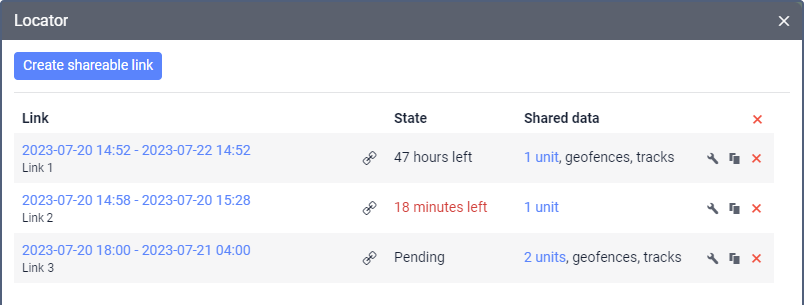
Wialon Locator Links allow businesses to share the real-time location of one or more vehicles through a customizable web link. Customers and other authorized stakeholders can open the link to follow vehicle movements on a map without receiving full access to the fleet’s Wialon account. Fleet managers can select which vehicles to display, schedule when the link becomes active, and determine how long it remains available. This makes Wialon Locator a practical tool for deliveries, service appointments, equipment transport, roadside assistance, and other operations where customers need timely location updates.
Improve Customer Visibility with Real-Time Vehicle Tracking
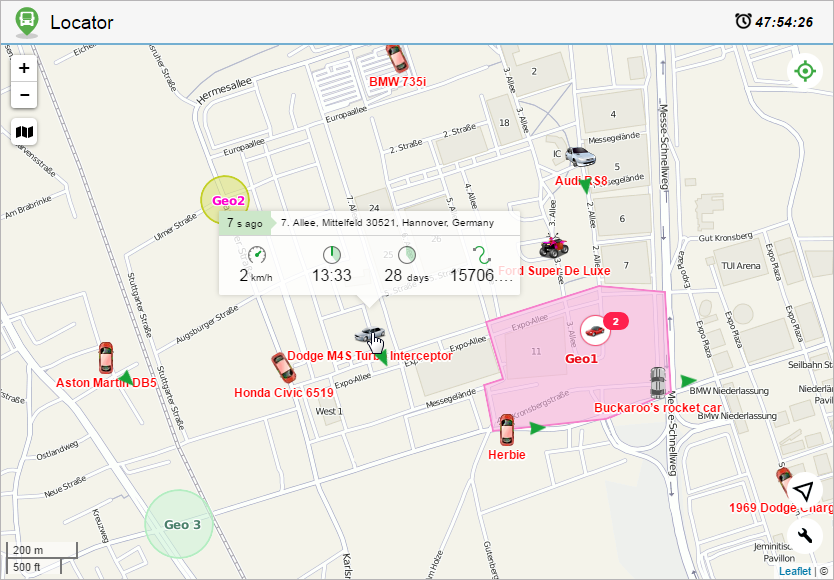
Wialon Locator Links give customers a convenient way to see where an assigned vehicle is and follow its progress toward a destination. The map automatically refreshes when new tracking messages are received, helping customers stay informed without repeatedly contacting dispatchers for updates. Depending on the vehicle’s status and link configuration, the Locator can also display details such as its latest location, movement status, speed, time in motion, and time since the last tracking message.

Reduce Status Calls and Simplify Communication
Providing a Wialon tracking link can reduce routine questions such as “Where is the driver?” or “When will the vehicle arrive?” Instead of sending repeated manual updates, dispatchers can share one link that gives the customer direct access to current location information. This can save administrative time, support more accurate coordination, and help delivery recipients, service customers, and project teams prepare for the vehicle’s arrival.
Control What Customers Can See and for How Long
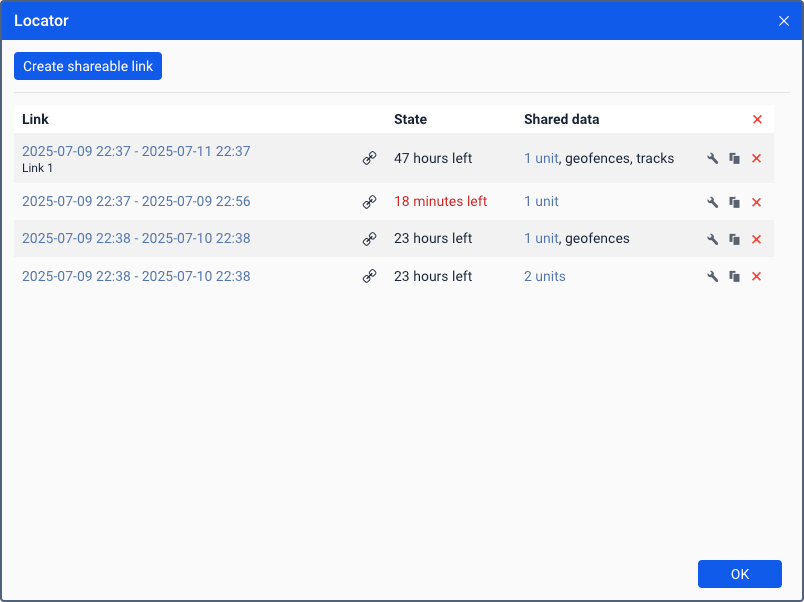
Wialon gives fleet managers control over each Locator Link. A link can include selected vehicles and be configured with a specific activation time and lifespan. Managers can also choose whether to display relevant geofences, recent vehicle tracks, and supported sensor values. Expired links are automatically deleted, helping businesses provide useful customer visibility without granting permanent access to their wider fleet information. Available options depend on the Wialon service, account permissions, tracking hardware, and system configuration.
Create a More Transparent Customer Experience with Forall Tracking
Wialon Locator Links help businesses communicate vehicle progress clearly while keeping shared access focused on the information customers need. Forall Tracking can help you configure Wialon location sharing for your fleet, select appropriate link settings, and integrate the feature into your customer-service workflow. Contact us to learn how Wialon Locator Links can improve customer visibility, reduce status inquiries, and simplify communication across your operations.
Frequently Asked Questions
What are Wialon Locator Links?
Wialon Locator Links are shareable web links that allow customers and other authorized stakeholders to view the real-time location of selected vehicles or assets on a map.
How do Wialon Locator Links work?
A fleet manager selects the vehicles to share, sets the link’s activation time and lifespan, chooses the information to display, and sends the generated link to the intended recipient.
Do customers need a Wialon account to open a Locator Link?
No. Customers can access the shared map through the link without receiving direct access to the fleet’s Wialon account.
Do customers need to install an application?
No. A Wialon Locator Link can be opened in a compatible web browser, making it convenient for customers using a computer, tablet, or smartphone.
Do Wialon Locator Links show vehicle locations in real time?
Yes. Wialon updates the vehicle’s position and current information when new messages are received from the installed GPS tracking device.
Can one Locator Link display multiple vehicles?
Yes. Fleet managers can select one or multiple vehicles when creating a link. This is useful when a customer needs visibility into several vehicles assigned to the same project or operation.
Can I choose which vehicles customers can see?
Yes. Only the vehicles selected when creating the link are included. Customers do not automatically gain visibility into the rest of the fleet.
Can I control when a Locator Link becomes active?
Yes. A link can become active immediately or at a scheduled date and time, allowing it to be prepared before a delivery, service appointment, or other planned operation.
Can I set an expiration time for a Locator Link?
Yes. Wialon allows the link lifespan to be configured in minutes, hours, or days. A link can also be created without a fixed expiration when ongoing access is appropriate.
What happens after a Wialon Locator Link expires?
After the configured lifespan ends, the link stops providing access and is automatically deleted from the list of Locator Links.
Can a Locator Link be disabled before it expires?
Yes. An existing Locator Link can be removed when access is no longer required, allowing fleet managers to end location sharing before its scheduled expiration.
Can customers see whether a vehicle is moving or stopped?
Yes. Depending on the vehicle’s current state and available tracking data, the Locator can display movement or stationary status and related information.
What vehicle information can customers see?
The shared view may display the vehicle name, latest location, movement direction, speed, time in motion, distance travelled during the current movement, stationary duration, and time since the last tracking message.
Can Wialon Locator Links display vehicle tracks?
Yes. Fleet managers can enable track viewing when creating a link. If enabled, recipients can generate tracks showing where selected vehicles have travelled since the Locator Link was activated, subject to Wialon’s applicable track limits.
Can geofences be displayed through a Locator Link?
Yes. Relevant geofences can be included in the shared map, helping customers understand vehicle locations in relation to delivery sites, service areas, depots, job sites, or other defined places.
Can sensor information be included in a Locator Link?
Yes. Supported sensor values can be displayed when the appropriate options and sensor masks are configured. The information available depends on the installed hardware, sensors, and Wialon setup.
Are Wialon Locator Links suitable for mobile devices?
Yes. Customers can open a Locator Link in a mobile browser. The interface can provide access to the shared map and supported sensor information from a smartphone or tablet.
Can Wialon Locator Links provide an exact arrival time?
The link provides current location and movement information that can help customers estimate progress, but it does not guarantee an exact arrival time. Traffic, route changes, stops, weather, and operational conditions can affect arrival.
How do Locator Links help protect fleet information?
Fleet managers control which vehicles and optional information are included and how long the link remains active. However, anyone who receives a valid link may be able to open it, so businesses should share Locator Links only with intended recipients.
How can Forall Tracking help with Wialon Locator Links?
Forall Tracking can help configure Wialon Locator functionality, determine suitable sharing settings, and integrate customer tracking links into your operational workflow. Contact us to discuss how real-time location sharing can improve customer communication and fleet visibility.

Check Pricing
All of our GPS tracking solutions are customized for your business and tailored to your budget...

Return on Investment
At GPS Tracking Canada, we understand that every company benefits from GPS Tracking in different ways...

Request a Demo
Get a live one-on-one demonstration from GPS Tracking Canada. See for yourself how customized...
For more information, or to schedule a demo or an installation,