

Wialon Reporting Tools
Wialon’s rich reporting tools transform available vehicle, driver, sensor, and operational data into structured information that fleet managers can review and act on. Customizable reports can combine tables, charts, statistics, and maps to examine trips, stops, mileage, engine hours, geofence visits, fuel activity, speeding, driver behaviour, and other supported metrics. The information available depends on the installed tracking hardware, connected sensors, account permissions, and system configuration.
Build Reports Around Your Operational Priorities
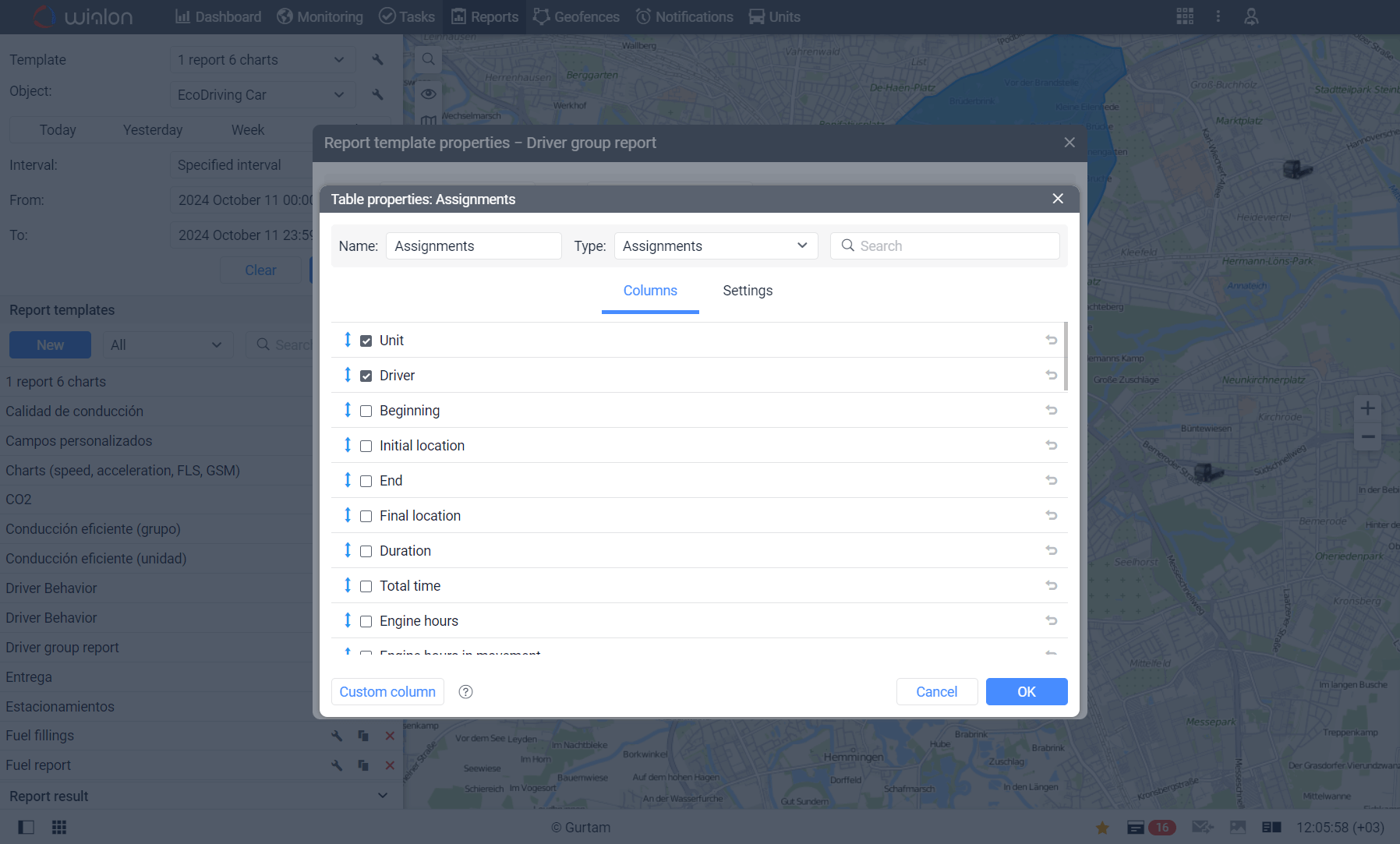
Wialon uses reusable report templates that can be configured for specific fleet-management needs. Users can select relevant tables and columns, organize information, apply filters, group results, and create supported custom calculations. This flexibility helps each department focus on the information it needs, whether that means monitoring daily vehicle activity, reviewing driver performance, analyzing fuel use, confirming customer visits, or supporting preventive maintenance decisions.


Export Fleet Reports in Multiple File Formats
Completed Wialon reports can be viewed online, printed, or exported in formats such as PDF, Excel, HTML, XML, and CSV. This range of export options makes it easier to present polished reports, perform further spreadsheet analysis, archive operational records, or share information with managers, customers, accountants, and other authorized stakeholders. Charts can also be exported in supported visual formats, giving businesses practical ways to communicate fleet trends and results.
Automate Report Delivery and Save Administrative Time
Wialon can automatically generate and email selected reports through configured jobs or notifications. Businesses can schedule recurring reports for relevant periods, such as daily, weekly, or monthly operations, without requiring users to manually create the same report each time. Automated delivery helps decision-makers receive consistent fleet information while reducing repetitive administrative work and supporting more timely operational reviews.

Make Fleet Information Easier to Use and Share
Rich Reporting with Export Options helps businesses convert telematics data into organized records that support operational oversight, performance analysis, and informed decision-making. With reusable templates, multiple export formats, and automated email delivery, Wialon makes fleet information easier to review, distribute, and retain. Contact us at Forall Tracking to learn how Wialon reports can be configured around your vehicles, business processes, and reporting priorities.
Frequently Asked Questions
What is Rich Reporting with Export Options in Wialon?
Wialon’s reporting functionality organizes available fleet data into customizable tables, charts, statistics, and maps. Reports can be viewed online, printed, exported to supported file formats, or automatically delivered by email.
What information can Wialon reports display?
Depending on the tracking hardware and system configuration, reports can show trips, stops, parking, mileage, engine hours, geofence activity, sensor readings, fuel consumption, speeding events, driver activity, and other operational information.
Can Wialon reports be customized?
Yes. Users can create report templates containing selected tables, charts, statistics, columns, filters, grouping options, and other settings. This allows reports to be adapted to different operational and management needs.
What is a Wialon report template?
A Wialon report template is a reusable configuration that defines the information and settings included in a report. Once created, the template can be used repeatedly for supported vehicles, drivers, groups, or other system objects.
Can I choose which columns appear in a Wialon report?
Yes. Wialon allows users to select, rename, and arrange available report columns. The column options depend on the report type and the data available from the vehicle, tracking device, and connected sensors.
Can Wialon create custom calculations in reports?
Wialon supports custom columns in many report tables. These columns can use formulas to calculate values from other columns, vehicle information, custom fields, and the selected reporting interval.
Can Wialon generate reports for multiple vehicles?
Yes. Unit-group reports can combine information from multiple vehicles or assets in one report. Availability and functionality depend on the report type, account permissions, and enabled Wialon modules.
Which file formats does Wialon support for report exports?
Wialon reports can be exported in HTML, PDF, Excel, XML, and CSV formats. Available settings and included content may vary by format and report configuration.
Can Wialon reports be exported to Excel?
Yes. Reports can be exported as Excel files for further analysis, filtering, calculations, recordkeeping, or use within existing administrative workflows.
Can I export a Wialon report as a PDF?
Yes. PDF exports provide a convenient format for presenting, distributing, printing, and archiving fleet reports. Users can configure supported PDF settings such as page orientation and size.
Why would I export a Wialon report as a CSV file?
CSV exports are useful when fleet data must be imported into spreadsheets, databases, analytics platforms, or other compatible business systems. Wialon also provides supported options for delimiters, encoding, and column headers.
Can Wialon reports include charts?
Yes. Supported report templates can include charts that help users understand changes and trends in fleet data. Individual charts can be exported in PDF or PNG format.
Can maps be included in Wialon reports?
Supported reports can display routes, geofences, event markers, and other location information on a map. Map availability in an exported report depends on the report template, selected content, and export format.
Can Wialon reports be viewed without exporting them?
Yes. Generated reports can be viewed directly within Wialon. Users can review supported tables, charts, statistics, and map information before printing or exporting the results.
Can Wialon reports be printed?
Yes. Wialon provides a printing option for completed reports. Users can also export a report as a PDF when they need a consistent file for printing or distribution.
Can Wialon reports be sent automatically by email?
Yes. Wialon jobs can be configured to generate and email selected reports automatically. This allows authorized recipients to receive recurring fleet information without manually running the report each time.
Can Wialon send daily, weekly, or monthly reports?
Yes. Automated report jobs can use selected reporting intervals, including previous days, weeks, or months. The delivery schedule and report period are determined during configuration.
Can Wialon generate a report when a specific event occurs?
Wialon can be configured to generate and deliver a report through a notification when specified conditions are detected. Available triggers depend on the notification settings, device data, sensors, account configuration, and enabled services.
How accurate are Wialon reports?
Report accuracy depends on the quality and frequency of incoming tracking data, GPS reception, sensor calibration, device installation, vehicle settings, and report configuration. Proper setup and ongoing data review are important for dependable results.
Can Forall Tracking help configure Wialon reports?
Yes. Forall Tracking can help businesses identify useful fleet metrics, configure suitable report templates, select export formats, and establish automated report delivery based on their operational requirements. Contact us to discuss your Wialon reporting needs.

Check Pricing
All of our GPS tracking solutions are customized for your business and tailored to your budget...

Return on Investment
At GPS Tracking Canada, we understand that every company benefits from GPS Tracking in different ways...

Request a Demo
Get a live one-on-one demonstration from GPS Tracking Canada. See for yourself how customized...
For more information, or to schedule a demo or an installation,