

Repositioning the OBDII Port
If you decide that the unit sticks out too much, then you could consider making a small adjustment, which is very easy for you to do. Keep in mind that some drivers may not want to be tracked. If the tracking unit is sticking out, then a driver may “accidentally” kick the unit, in order to disable it. By repositioning the OBDII port you can help prevent against this.
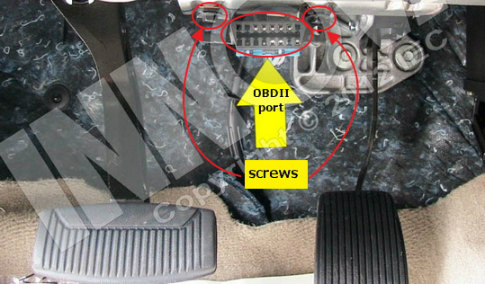
Process for Repositioning the OBDII Port
Unscrew the OBDII port, turn it 90°, and tie it back into the vehicle with a simple twist tie. Every OBDII port is connected to the body of the vehicle with either two screws, one single screw, or no screws at all – ie. it pops in/out of the frame.
If you decide that you do not want to make this small adjustment, then you can purchase an OBDII extension cable to extend the reach of the Geotab GO device or a T-harness which will allow an additional OBDII port to remain available.
Contact us if you have any questions on this process.

Check Pricing
Explore GPS fleet tracking solutions tailored to your business needs and budget.

Return on Investment
See how GPS fleet tracking can help improve efficiency, reduce costs and increase visibility across your fleet.

Request a Demo
Get a live, one-on-one demonstration and see how Forall Tracking can help your business.
For more information, or to schedule a demo or an installation,